Skip to content

Beta

ML Engineering / Local experimentation

Small adjustments. Big runs.

Trimtab tests your training project on your Mac with a few smart trials, then hands you one command for the full GPU run.

See how it works

01How it works

From project to recommendation.

Explore small changes locally before committing to a full training run.

01Ready

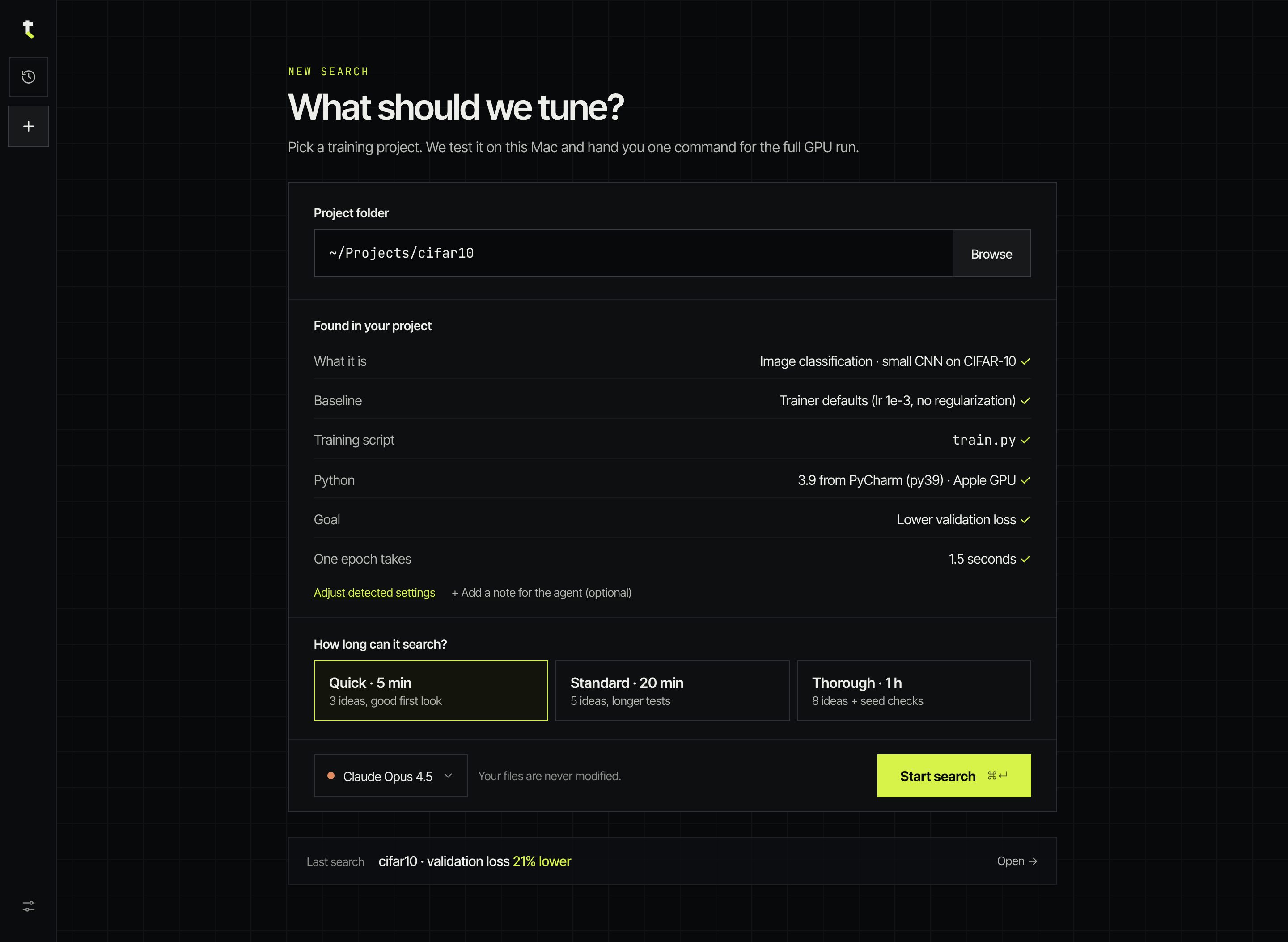
Start with your training project.

Point Trimtab at a folder. It reads the project and shows what it found before anything runs.

Project folder
Pick the training project on your Mac. Your files are never modified.
Found in your project
What the model is, the baseline settings, the training script, the Python environment, the goal and how long one epoch takes. You can adjust any of it.
Search length
Quick (3 ideas, about 5 min), Standard (5 ideas) or Thorough (8 ideas + seed checks).
Model
The language model that proposes ideas: a hosted provider with your own key, or a local model.
Start search
One button at the end of the card.
Trimtab Ready screen: project folder ~/Projects/cifar10, detected project details, Quick / Standard / Thorough search lengths, model picker and Start search.

02Running

Watch the experiments unfold.

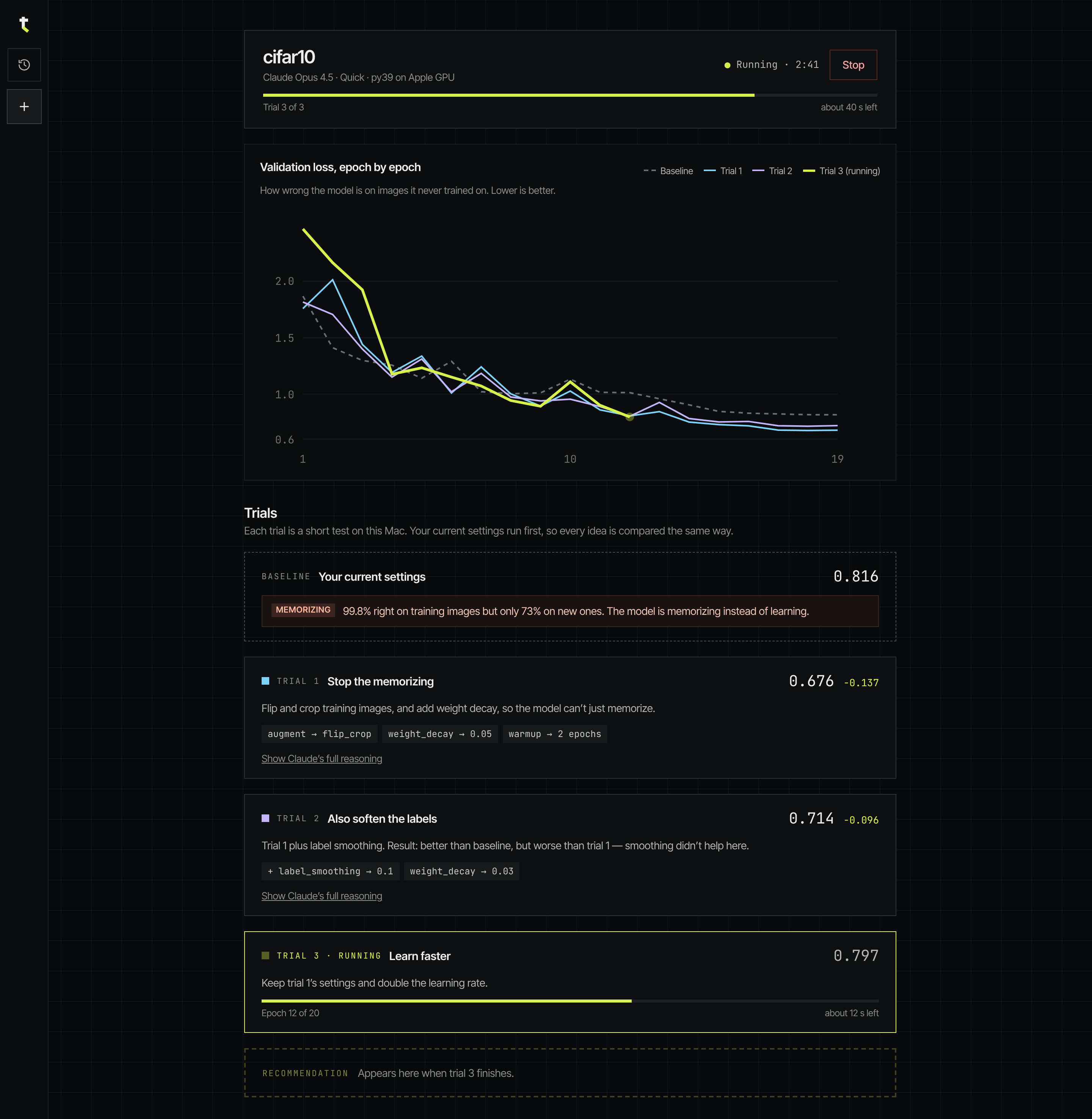
Each trial is a short real training run on your Mac, measured the same way as your current settings.

Baseline first
Your current settings run first, so every idea is compared the same way.
Smart trials
Each trial names its idea and the exact changes, for example augment → flip_crop, weight_decay → 0.05.
Live validation loss
A chart per epoch: the baseline dashed, each trial in its own colour.
Progress
Trial count, elapsed time and the time left. Stop at any point.
Trial history
Finished trials stay as cards with their result and the change against the baseline.
Trimtab Running screen: progress for trial 3 of 3, a validation loss chart per epoch against the dashed baseline, and trial cards with their changes and results.

03Done

Get a concrete next step.

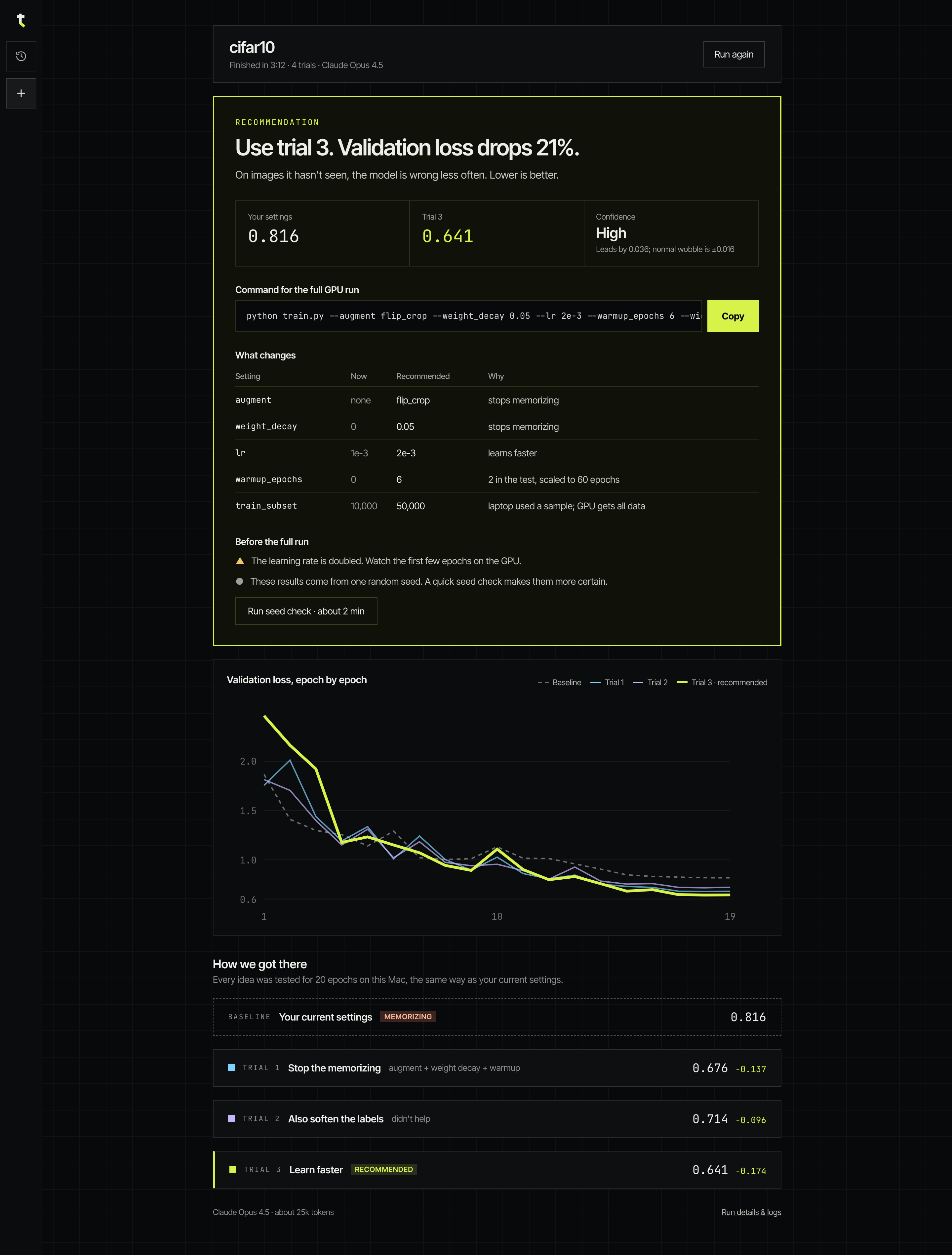
The recommendation comes first, with the evidence behind it underneath.

Recommended changes
The settings to change, as a table against your baseline.
Supporting results
The chart and every trial row: how Trimtab got there.
Compared with the baseline
Before → after and the change, computed in code, not guessed by the model.
Full GPU training command
One command to copy, with laptop-only flags swapped out and epoch-based settings rescaled.
Trimtab Done screen: the recommendation to use trial 3, the full GPU command with Copy, the table of changes, notes before the full run, the chart and how Trimtab got there.

04History

History stays on your Mac.

Your experiment history is saved locally on your Mac, so you can revisit previous runs whenever you need.

One shortcut
Open History from the left rail or with ⌘H.
Grouped by project
Each run shows its date, the model and its result against the baseline, or that it was stopped.
Find and tidy
Search runs, rename them, delete them or clear stopped runs.

02Results

Measure the difference.

Compare experiments against the baseline and inspect the evidence behind each recommendation.

The search: validation loss, epoch by epoch

CIFAR-10 demo project · small CNN · 10k training images · 19 epochs per trial on a MacBook · about 3 minutes. Lower is better.

0.61.01.52.02.5 11019
  1. Baseline Your current settings trainer defaults 0.816
  2. Trial 1 Stop the memorizing augment → flip_cropweight_decay → 0.05warmup → 2 epochs 0.679−0.137
  3. Trial 2 Also soften the labels + label_smoothing → 0.1weight_decay → 0.03 0.720−0.096
  4. Trial 3 Learn faster trial 1 + lr → 2e-3 0.642−0.174

Recommendation

Trial 3: regularize, then learn faster.

val_loss, baseline
0.816
val_loss, trial 3
0.642
Change
−0.174 (−21%)
Parameter changes against the baseline
SettingBaselineRecommended
augmentnoneflip_crop
weight_decay00.05
lr1e-32e-3
warmup_epochs02

Full GPU run

python train.py --augment flip_crop --weight_decay 0.05 --warmup_epochs 2 --lr 2e-3 --width 2 --batch_size 128 --train_subset 10000 --epochs 60

As recorded on 2026-10-25, under Trimtab’s former name. The verification runs below scaled warmup to 6 of 60 epochs; Trimtab now rescales epoch-based settings in the command itself.

Does it hold on the full run?

Full 60-epoch runs of the recommended settings against the trainer defaults · mean ± std over seeds · recorded 2026-10-26

Final validation loss after 60 epochs
Training dataSeedsBaselineRecommendedChange
10k training images31.087 ± 0.0250.695 ± 0.026−36%
All 50k images20.857 ± 0.0130.363 ± 0.009−58%
0.40.60.81.01.2 1204060

Validation loss per epoch, all 50k images, mean of 2 seeds. The baseline is lowest around epoch 10, then climbs: a short test hides it.

Read this as a data point, not a ranking

  • One task: a small CNN on CIFAR-10, with a demo trainer that overfits with its defaults.
  • 2 to 3 seeds per setting, so the ± values are rough.
  • The “GPU” runs were the full-data run on the same Mac, not a rented GPU.
  • No comparison against random search or Optuna yet.
  • Searches are not deterministic: another Trimtab search can propose different trials.

03Why Trimtab

A small adjustment can steer a much bigger run.

  • Small local experiments

    Trials are real training runs on your Mac, sized to a time budget, before you spend GPU hours.

  • Baseline comparisons

    Your current settings run first, under the same conditions, and every comparison is computed in code.

  • Actionable recommendations

    The settings to change and why, with the confidence stated plainly. Ties are called ties.

  • Full GPU run command

    A ready GPU command for the next full training run, nothing to reassemble by hand.

Small adjustments. Big runs.

Install the beta on your Mac and run your first search in a few minutes.